Why use QuickZone?
Traditional zone libraries like ZonePlus and SimpleZone act as wrappers for Roblox's physics engine (e.g., GetBoundsInBox, GetPartsInPart or .Touched), resulting in expensive collision geometry calculations and synchronization overhead.
QuickZone bypasses the physics engine in favor of geometric math and data-oriented design. It implements a Linear BVH (LBVH) that resolves spatial queries using highly optimized VM bytecode to eliminate overhead.
1. The Entity-Centric Model
Traditional libraries are Zone-Centric. They iterate through every Zone instance and query the physics engine for overlapping parts (i.e. entities in QuickZone-terms).
-
The Scaling Problem: Performance worsens as you add more zones (O(Z)), even if the number of entities remains static. QuickZone, on the other hand, is Entity-Centric. It keeps a list of entities and queries them against an LBVH (O(N log Z)).
-
The Benefit: This means that you can have hundreds, even thousands, of zones with close to zero runtime cost. The cost effectively becomes a factor of the number of entities that are being processed.
2. Expressive and Boilerplate-Free API
Writing performant code shouldn't mean writing complicated code. QuickZone is designed to be highly ergonomic.
-
CollectionService Integration: Tag your parts and bind them to your logic in a single line of code (e.g.,
Zone.fromTag('Lava')). -
Declarative Configurations: QuickZone lets you define behaviors, priorities, and relationships upfront in simple configuration tables, drastically reducing boilerplate and keeping your scripts clean.
-
Lifecycle Management: Replace event-based logic with the observe pattern for declarative logic. Return a function when a player enters, and it runs automatically when they exit. There is no need to manually track
onEnterandonExitstates.
3. Data-Oriented Design (DOD)
Most Roblox libraries rely heavily on Object-Oriented Programming (OOP). QuickZone is built entirely around Data-Oriented Design, prioritizing how the CPU actually reads memory.
-
Structure of Arrays (SoA): QuickZone stores data in parallel, primitive arrays for maximum performance.
-
Contiguous Memory: QuickZone stores its LBVH and entity data in pre-allocated, flat arrays. This completely eliminates slow pointer-chasing and guarantees maximum CPU cache locality.
-
Bitwise Spatial Sorting: To effectively map 3D space into these flat 1D arrays, QuickZone utilizes Morton Codes (Z-Order Curves). By transforming 3D coordinates into integers via highly optimized bitwise operations, spatial queries become instant array lookups.
-
Zero GC Pressure: Because QuickZone relies on stable arrays and aggressive object pooling, it generates practically zero garbage during runtime. This completely eliminates the micro-stutters typically caused by Luau's Garbage Collector cleaning up old tables.
-
Iterators: QuickZone provides zero-allocation generators like
iterEntitiesInside. Because these iterators allocate no new memory, QuickZone is a perfect library for Entity Component System (ECS) workflows.
4. Architecture
QuickZone moves away from monolithic, instance-bound logic in favor of a Group-Observer-Zone topology. This architecture separates what is being tracked from where the tracking occurs and how the system should respond.
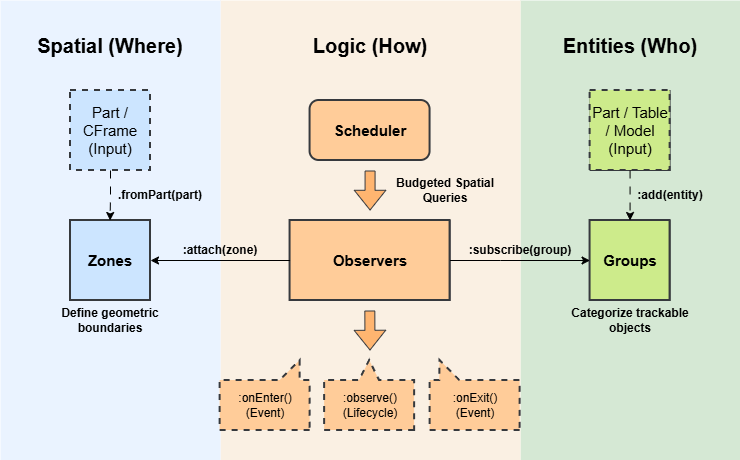
Groups
A Group is a collection of entities that share logical categorization. An entity can be part of multiple groups at the same time.
Observers
Observers act as the logic bridge. They subscribe to Groups and are attached to Zones, creating a many-to-many relationship that keeps game logic decoupled and clean. Performance can be configured per Observer, like setting the update rate in Hz or the precision, i.e. the minimum distance threshold to perform a spatial query, in studs. This prevents wasting CPU cycles checking a slow-moving NPC, for example.
Because Observers are decoupled from the physics engine, they can aggregate spatial data. Tracking an entire Group costs no additional spatial queries. And through the use of observeGroup, an Observer can fire an event when the first member of a Group enters a zone, and clean up when the last member leaves.
5. The Budgeted Scheduler
A common issue with spatial libraries is stutter due to it processing too many things in one frame. QuickZone fixes this via its smart Scheduler.
Frame Budgeting
You can set a hard time limit (e.g., 1ms). The Scheduler monitors os.clock() in real-time. If the budget is met, the system pauses immediately and resumes in the next frame. This guarantees that QuickZone will never be the cause of a frame drop.
Workload Smearing
The scheduler smears updates across frames. This means that, if you have a Group of 600 entities updating at 10Hz, QuickZone will process exactly 100 entities per frame at 60 fps. This ensures that we have flat, predictable performance profile with no peaks or valleys.
No starvation
The Scheduler uses a Round-Robin strategy for Group processing. Instead of processing groups in order, QuickZone cycles through them fairly. This prevents the issue where a heavy group keeps consuming the entire frame budget and 'starving' the subsequent groups.
6. Dual-LBVH and Batched Rebuilding
To maintain high performance, QuickZone maintains two LBVHs:
-
The Static LBVH: Contains all non-moving, non-resizing zones.
-
The Dynamic LBVH: Contains zones attached to moving parts (e.g., vehicles, platforms).
Optimization via Batching
Rebuilding an LBVH is computationally expensive. QuickZone optimizes this by batching updates per frame: if multiple zones are added, removed, or moved in a single frame, QuickZone will only perform a single rebuild at the start of the Scheduler step.
By separating static and dynamic zones, QuickZone minimizes the workload of the LBVH rebuilder. Rebuilding a small tree of 5 moving platforms is significantly faster than rebuilding a tree containing 500 static buildings.
Rebuilding the LBVHs is part of the frame budget. Thus, rebuilding will result in less time for processing the groups of entities.
Demand-Driven Queries
QuickZone will only perform a spatial query for an entity against the Dynamic LBVH if it is tracked by an Observer that is explicitly attached to a dynamic zone. If your observers only care about static zones, the dynamic tree is bypassed entirely for those entities, saving potentially thousands of unnecessary checks per second.
7. Flexibility
Because QuickZone relies on pure math rather than the Physics engine, it is not limited to BaseParts. It also supports duck typing for entities.
-
Players: Uses
.Positionof the player character's HumanoidRootPart. QuickZone automatically handles the messy lifecycle of characters spawning, dying, and streaming in or out for you. -
BaseParts: Uses
.Position. -
Models: Uses
.PrimaryPart.Positionor:GetPivot()(if.PrimaryPartdoes not exist). -
Attachments/Bones: Uses
.WorldPosition. -
Cameras: Uses
.CFrame.Position. -
Custom Tables: Uses any custom
.Position,.WorldPositionand.CFramefield, or a:GetPivot()method. This allows you to track real-time simulations (e.g. a spell cast or an RC car) without the overhead of creating physical Instances.
8. Performance Benchmarks
We stress-tested QuickZone against the most popular alternatives in two distinct scenarios: Entity Stress (lots of moving parts) and Map Stress (lots of zones).
Note: For the QuickZone benchmark, we used a frame budget of 1ms, the entities' update rate was set to 60Hz, and precision was 0.0.
Test 1: High Zone Count
Scenario: 500 moving entities, 10,000 zones, recorded over 30 seconds.
This test highlights the fundamental flaw in traditional Zone-Centric libraries. As map complexity grows, their performance degrades exponentially.
| Metric | QuickZone | ZonePlus | SimpleZone | QuickBounds | Empty Script |
|---|---|---|---|---|---|
| FPS | 59.25 | 3.84 | 5.53 | 58.95 | 59.28 |
| Events/s | 643 | 627 | 519 | 328 | 0 |
| Memory Usage (MB) | 18.57 | 4230 | 99.79 | 17.62 | 0.65 |
The Result: QuickZone maintained a perfect 60 FPS.
- ZonePlus and SimpleZone imploded, dropping to 3-5 FPS, making the game unplayable.
- ZonePlus consumed over 4 GB of memory, which would crash most mobile devices instantly.
- QuickZone proved its O(N log Z) algorithmic advantage.
- QuickZone vs. QuickBounds: Both libraries scaled well by maintaining ~60 FPS. However, QuickZone still maintained a slight FPS lead and, more importantly, delivered double the event throughput (643 vs 328) compared to QuickBounds.
Test 2: High Entity Count
Scenario: 2,000 moving entities, 100 zones, recorded over 30 seconds.
| Metric | QuickZone | ZonePlus | SimpleZone | QuickBounds | Empty Script |
|---|---|---|---|---|---|
| FPS | 42.37 | 29.88 | 37.23 | 41.31 | 42.73 |
| Events/s | 2271 | 2482 | 2518 | 566 | 0 |
| Memory Usage (MB) | 2.13 | 159 | 1.77 | 2.60 | 1.04 |
The Result: QuickZone is the only library that maintained near-baseline FPS (-1% impact).
- ZonePlus caused a 28% drop in framerate.
- QuickZone handled the load with 98% less memory than ZonePlus.
- QuickZone vs. QuickBounds: QuickZone averages ~1 FPS higher than QuickBounds. More importantly, QuickZone processed 4x the volume of events (2,271 vs 566).